The employee app for your company
Configured in ApptiveGrid, no app development required.
Forms, news, links and contacts: your employees get everything in one app, you maintain the content in a space. Changes reach the app instantly – without a store update.
Free app for iOS and Android. Already have an account and just need the app? Get the app
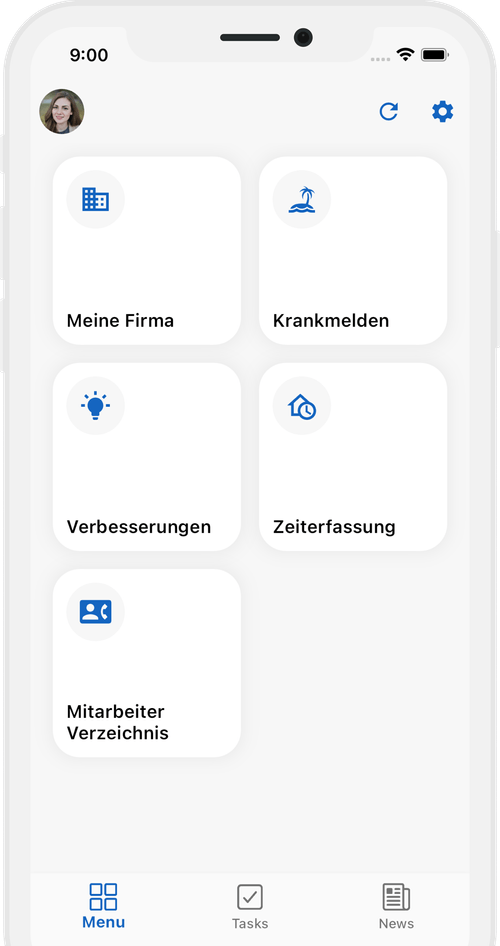
How the app reaches your employees
You do not build an app. You fill a space – and ApptiveTeams displays it.
- 01
Create a Team Space
You start from our Team Space template in ApptiveGrid: logo, colours and the tabs of the app are defined in grids.
- 02
Maintain the content
Forms, news, links and contacts are rows in grids – maintained like any other table in ApptiveGrid.
- 03
Invite your employees
Every invited person gets an account, installs the free app and signs in. They see only what their role allows.
- 04
Change it any time
A new tile, a changed form, a different logo: the app picks it up on the next launch. No store update, no review by Apple or Google.
Everything in one app
Time tracking, requests, documents, contacts: ApptiveTeams connects your employees with the processes and information they need every day.
One central place
All company processes and information in a single app - no juggling multiple tools.
Time tracking
Clock in and out straight from a smartphone. Working hours land in your database without paper slips or later data entry.
Employee directory & address book
Colleagues with their role, department and extension - and external contacts such as customers and suppliers in the same directory. From a single source, and therefore always up to date.
Forms & requests
Leave requests, expense reports, incident reports - filled in and submitted straight from a smartphone.
Documents
Payslip, contract, safety instruction: everyone sees their own paperwork and the company's. Acknowledging an instruction happens in the app and is on record.
Digital workflows
Employees are guided through processes and kept informed about the status of their requests.
Secure & GDPR-compliant
Your company data stays on German servers. Made in Germany.
Roles & permissions
Every employee sees only what is relevant to them - controlled through roles and permissions.
Push notifications
Employees are notified automatically whenever something needs their attention.
What companies run through it
Each of these is a form or a grid in your space – and therefore a tile in the app.
Leave & absence
Request in the app, approval by the manager, confirmation by push.
Expenses
Photograph the receipt, enter the amount, submit – accounting sees it in the grid right away.
Damage & incident reports
What is broken gets reported where it is noticed: with photo, location and urgency.
First-aid log
The entry after an accident from the phone instead of the binder – available as a ready-made template.
News & notices
What used to hang on the notice board now reaches the shift that is not on site.
Contacts & links
Who is responsible for what, where the form lives: maintained in one place, current for everyone.
What you need
An ApptiveGrid account
ApptiveTeams is not separate software; it is the app for your ApptiveGrid. Create an account, set up a space, done.
A Team Space
A space marked as a Team Space drives the app. We provide a template as a starting point – the documentation explains the details.
One plan for all your employees
Every person using the app signs in with their own account – a single account is not enough. Pricing depends on your headcount and starts at €1 per employee per month. The app itself is free.
ApptiveTeams under your own name
Want to offer your employees an app that fully matches your company? With the white-label version of ApptiveTeams you get a ready-made employee app - under your name, with your logo, in your company's app store listing.
- Your own branding: logo, name and colours of your company
- Your own listing on the App Store and Google Play
- Fully configurable content and processes
- No technical know-how required
How it works
- 01
Consultation
We get to know your requirements and show you what is possible with white label.
- 02
Configuration
We set the app up with your branding and your company processes.
- 03
Publication
The app goes live on the App Store and Google Play under your company name.
Common questions about ApptiveTeams
Do employees need their own account?
Yes. Each person signs in to the app with an ApptiveGrid account and is invited by you to the Team Space. That way it is clear who submitted what, and everyone sees only the content their role allows.
What does ApptiveTeams cost?
The app is free in both stores. You pay for ApptiveGrid, per employee who uses the app: from €1 per person per month, priced individually by company size. A single Pro account is not enough, because every person signs in with their own account. Get in touch and we will work it out for your headcount.
Do I have to publish my own app in the stores?
No. Your employees install ApptiveTeams; logo, colours, tabs and content come from your Team Space. If the app should appear under your own name in the stores, that is the white-label option.
How quickly do changes reach the app?
Immediately. Change a tile, a form or the logo in the space, and the app loads it on the next launch or refresh. No store update is needed.
Which devices does ApptiveTeams run on?
On iPhone and iPad via the App Store and on Android via Google Play. You set everything up in the browser in ApptiveGrid; you only need a phone to check the result.
Where is the data stored?
In your ApptiveGrid space on servers in Germany. The app displays that data and writes entries back to it; there is no second copy.
Can I try ApptiveTeams first?
Yes. Create a free account, set up a Team Space from our template and install the app. For the rollout to your team, we agree on a plan that matches your headcount.
The app your employees will install:
Put your company in one app
Create an account, set up a Team Space from the template, invite your employees. Or we walk through the setup together.